
Controlling more than just lighting with the JB-161HN module
Content
A simple way to integrate lighting into JA-100+
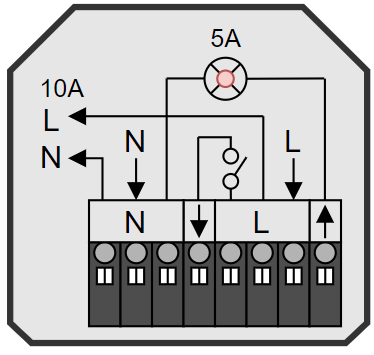
The JB-161HN wireless in-wall switch module allows for quick and easy resolution of the most common customer requirements for additional automation of lighting and similar appliances.
Below, we will look at several of the most common scenarios, including wiring and configuration.
Setting up automatic switching between DAY and NIGHT mode
The applications listed below require automatic switching between day and night mode. JA-100+ control panels utilise an astronomical calendar and the geographical location of the installation, which they use to calculate sunrise and sunset times. Depending on the DAY / NIGHT mode, the system controls not only the lighting, but also the backlighting or acoustics of keypads and other peripherals.
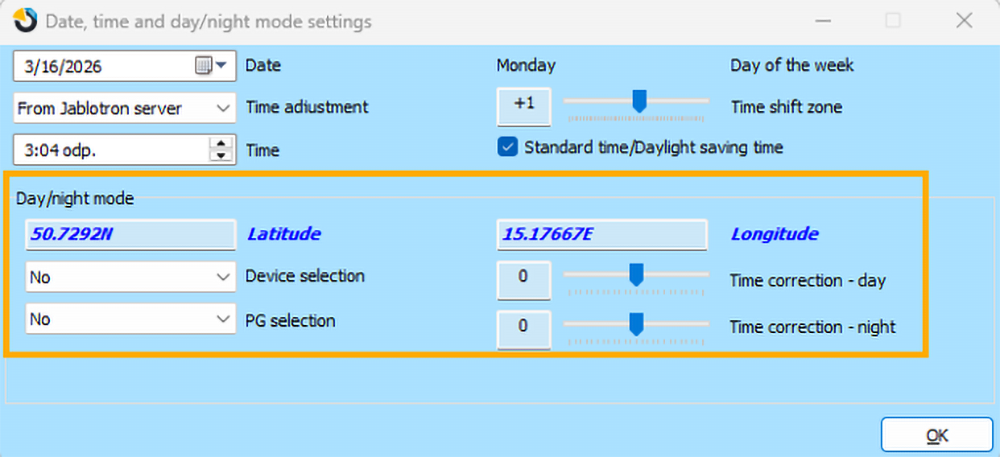
To activate the automatic DAY / NIGHT mode, the geographical coordinates of the installation must be entered:
- The configuration is carried out in F-Link on the Parameters > Date/Time tab
- The coordinates must be entered in the
shortened format 12.3456N and 12.3456E. A suitable GPS format is provided, for example, by the Mapy.com server: after searching for the installation address, click on “GPS” and copy the coordinates, rounded to 4 decimal places, into F-Link.
- The Peripheral Selection / PG Selection options also allow the DAY / NIGHT mode to be controlled externally rather than by calculation, via the activation of a selected peripheral or PG output. You can use this setting if you have a twilight switch or another ambient light level source with a logic output connected to the system.
- Time correction allows you to shift the activation of DAY / NIGHT modes for specific conditions, for example, if the building is orientated in the shadow of a western slope, etc.
Application scenarios:
- Automated night lighting for stairs / corridors
- Automated decorative garden lighting
- Automatic light shut-off in areas with no movement
- Automatic lighting of company common areas during working hours
- Manual lighting control from multiple locations (with a switch)
- Manual lighting control from multiple locations (with push buttons)
- Automatic control of a bathroom fan by a thermostat
- Automatic control of a toilet / bathroom fan according to lighting
Scenario 1: Automated night lighting for stairs / corridors
Required behaviour:
- During the day, the light can be controlled manually using switches, for example during cleaning or when there is insufficient daylight.
- At night, the light turns on automatically when movement is detected on the stairs / corridor / corridors on both floors.
- When the system is set, the light turns off automatically, even if it was turned on manually with a switch.
What you will need:
- 1x JB-161HN module
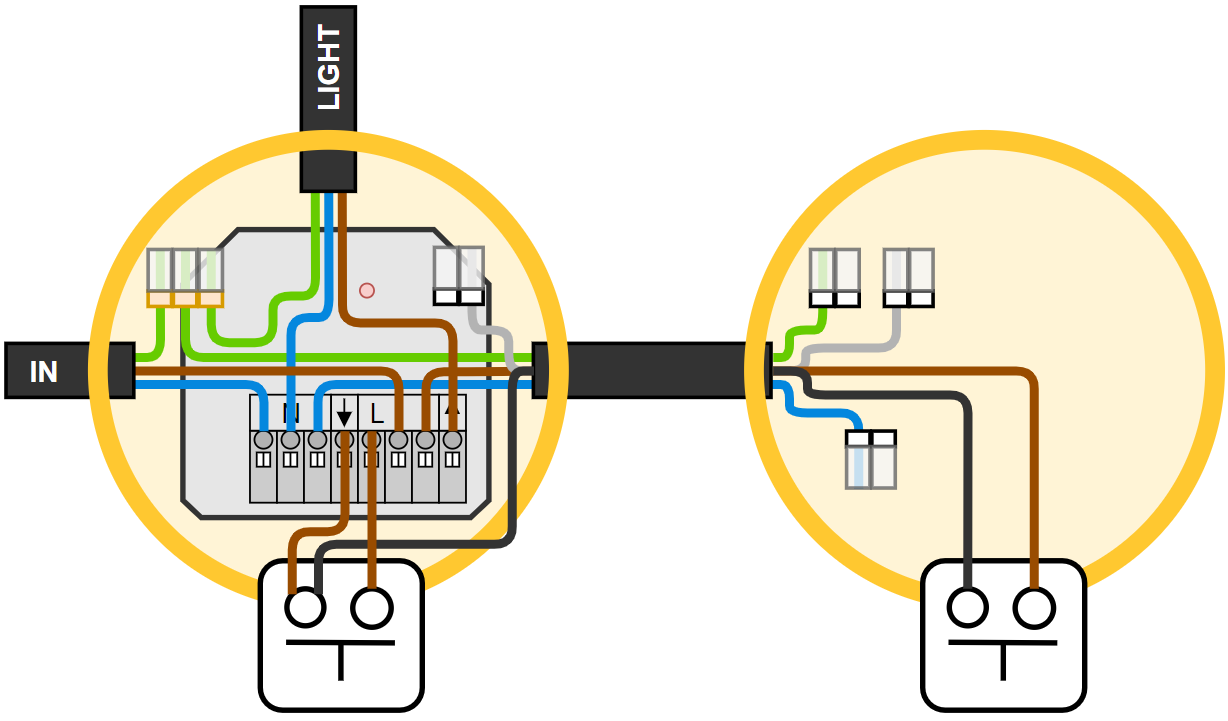
- Switches (spring-loaded push buttons) on both sides of the stairs / corridor
- Cable connection between the buttons for their parallel connection to the module (otherwise, see scenario 6).
Wiring:
Settings:
- The selected PG output in the range of 1 to 32 will copy the selected motion detectors in the corridor / adjacent staircase with an appropriate switch-off delay.
- The PG can also be triggered automatically during an alarm to create the impression that someone is home in order to deter an intruder, or to facilitate orientation during a fire alarm at night, etc.

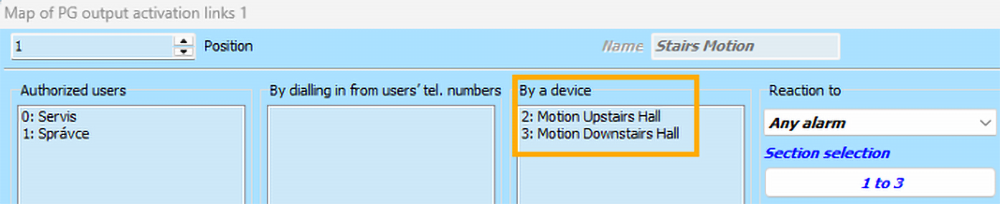
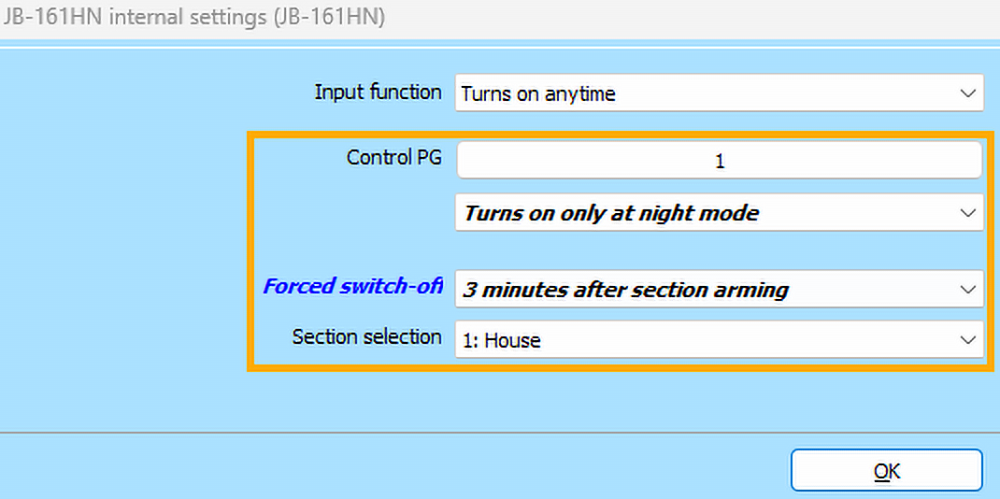
- In the internal settings of the JB-161HN, assign the prepared PG as a control, and leave the function set to “turn on only in night mode”. Leave the input function for manual control via a switch set to “turn on at any time”, which will allow the switch to turn on the light even during the day.
- For forced switching off when leaving the premises, select the function “3 minutes after arming the section” and choose the section that is armed upon full exit from the premises (the module only reacts to full arming and ignores partial arming).
Tip: To simulate presence in set premises, you can trigger the “Stairs movement” PG using a calendar.
- Set calendar actions at various random times during the night, which will turn the PG on and off.
- Create a PG copying the unset status of the section and use it to block calendar actions to prevent switching when the residents are at home.
Scenario 2: Automated decorative garden lighting
Required behaviour:
- During the night, the light can be controlled manually from MyJABLOTRON or via a switch from inside the premises. During the day, manual control is blocked to prevent energy wastage when lighting up the garden is hard to notice, for example by children or visitors.
- It turns on automatically at dusk for evening movement around the house. If there is no movement in the garden or the doors are not open, it turns off automatically at 23:00.
- Outside this period, it turns on automatically when movement is detected in the garden, or upon opening the patio door, front door, or garage door. This ensures it will light up automatically during any entry into the garden, for example during a summer gathering with friends or a morning departure for work.
- When leaving and setting the garden, the light turns off automatically even if it was turned on manually via a switch or from the application. Subsequently, however, it can be turned on again even in the set state.
What you will need:
- 1x JB-161HN module
- Switch (spring-loaded push button) or a standard switch
Wiring:
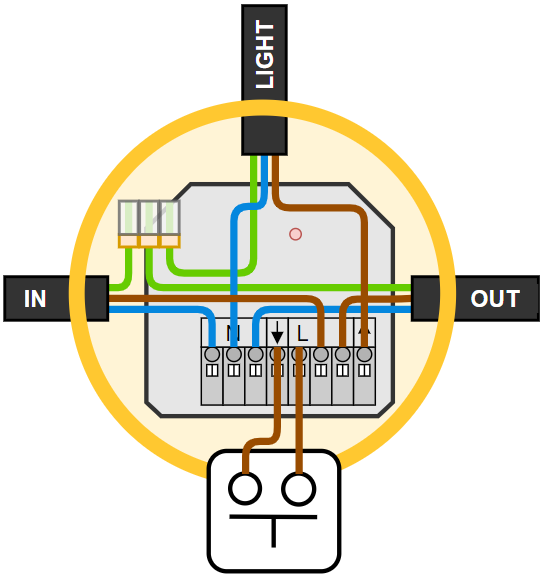
Settings:
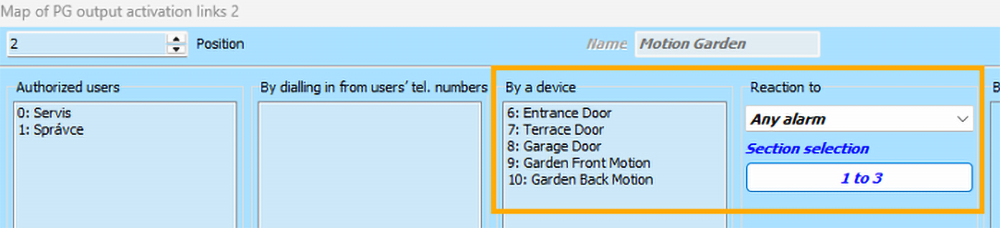
- In this case, where a combination of conditions is required, we will need 2 PG outputs: the first with the “on/off” function for status control, and the second with the “copy with switch-off delay” function for impulse control.

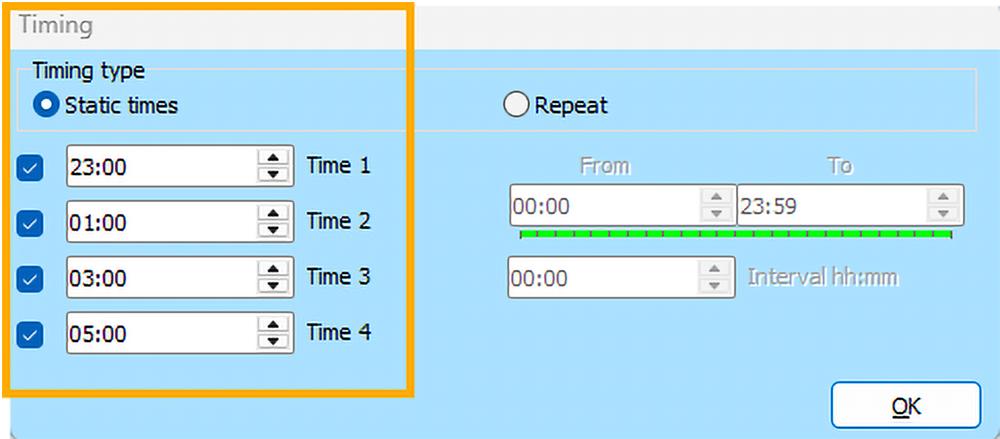
- The first PG turns on automatically at dusk and the calendar turns it off automatically at the set time. At the same time, manual control from MyJABLOTRON is possible.
- In the settings of the calendar timing, we recommend setting multiple off times. The system will thus also monitor an overlooked manual switch-on from the application during the night.

- The second PG turns on when the assigned motion detectors or opening detectors are activated.
- At the same time, you can set it to turn on during an alarm, so that lighting up the garden attracts attention and helps deter an intruder.
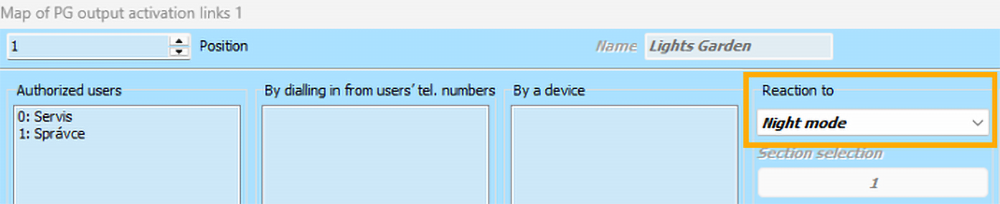
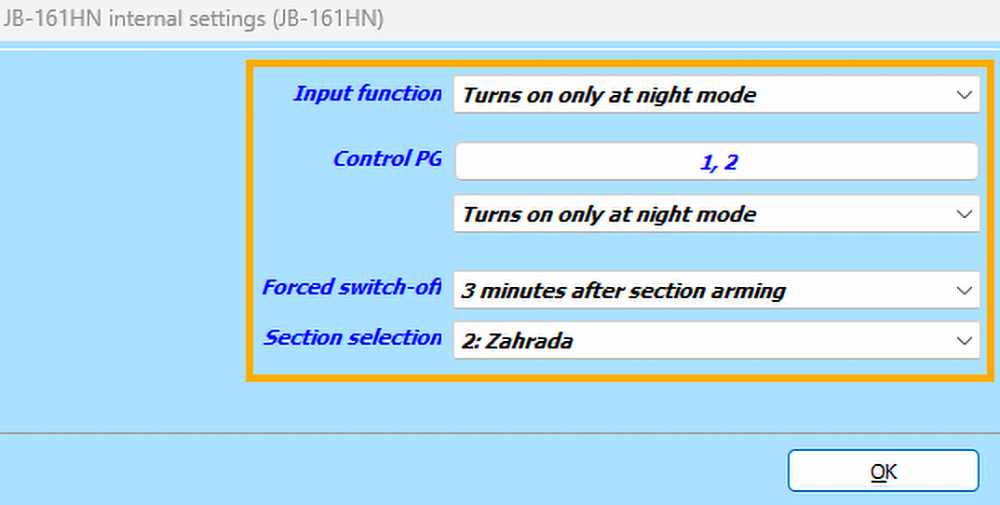
- The mechanical switch or push button (input) will turn the light on only in night mode.
- Both prepared PGs will also turn the light on only in night mode.
- The module will force the light to turn off once the garden is set.
Scenario 3: Automatic light shut-off in areas with no movement
Required behaviour:
- Automatically turn off if movement in the room ceases for a defined period of time.
- If the module is connected to a switch, align the lighting with the switch position again once movement resumes (if it is still switched on, turn the light on automatically).
- If the module is connected to a push button (spring-loaded button), pressing it again is required to turn the light back on when entering the room.
What you will need:
- 1x JB-161HN module
- Switch (spring-loaded push button) or a standard switch
Wiring:
Settings:
- In this case as well, we will use a PG that will copy the movement in the respective area with a switch-off delay. This time, however, we will not use the PG to turn the light on, but to turn it off after the switch-off delay times out.


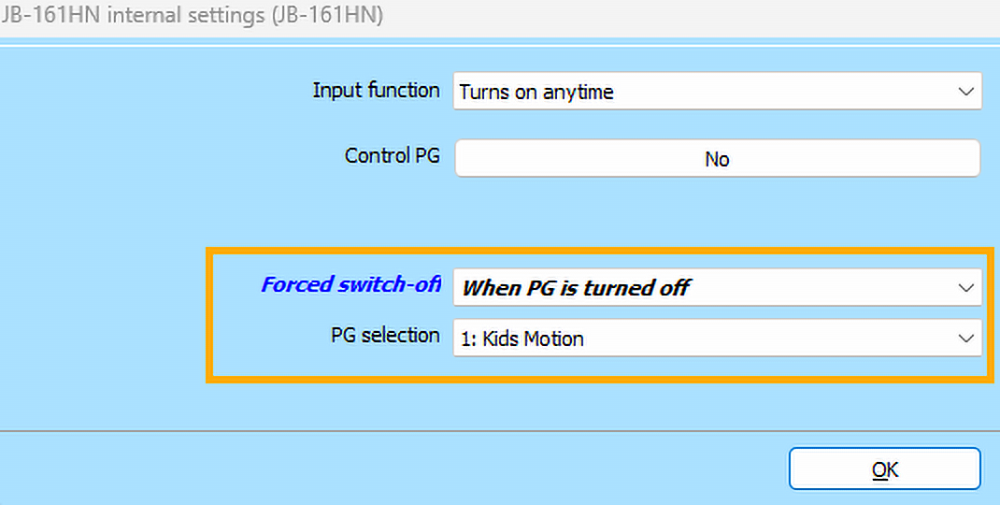
- In the JB-161HN module, set a forced shut-off to trigger when the prepared PG output turns off. As soon as movement ceases, the module turns off the light regardless of the switch position. Subsequently, however, it can be turned back on manually at any time; if the switch is on, the module turns the light on automatically once movement resumes.
Tip: To automatically turn the light on during an alarm or to simulate presence, it is necessary to create another PG with the “copy with switch-off delay” function that reacts to a system alarm or is controlled by a calendar. Set this PG as a control.
Scenario 4: Automatic lighting of company common areas during working hours
Required behaviour:
- Controlling the lighting via movement is not very suitable in this case, as common areas would require a large number of detectors and high occupant turnover would cause inconvenient frequent switching on and off of the light fixtures.
- It is therefore more appropriate to link the lighting automation to the presence of the first to last employee, turning it on automatically when the common areas are unset:
- At the same time, allow manual switching on even in the set state, so that an arriving employee can turn on the light before reaching the keypad, or in case they experience an issue with unsetting the system.
- When the common areas are set, turn off the light automatically regardless of the switch position, but provide the last employee with sufficient time to leave before the light goes out.
What you will need:
- 1x JB-161HN module
- Switch (spring-loaded push button) or a standard switch
Wiring:
Settings:
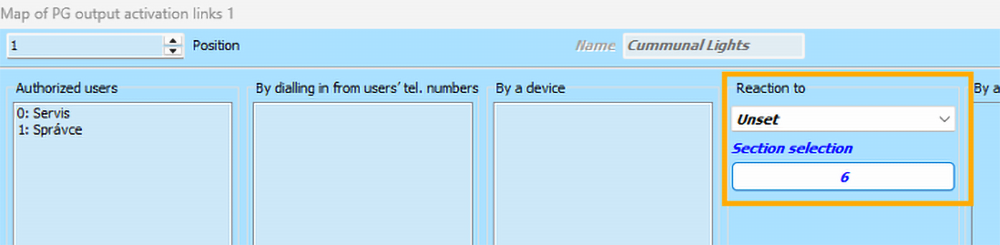
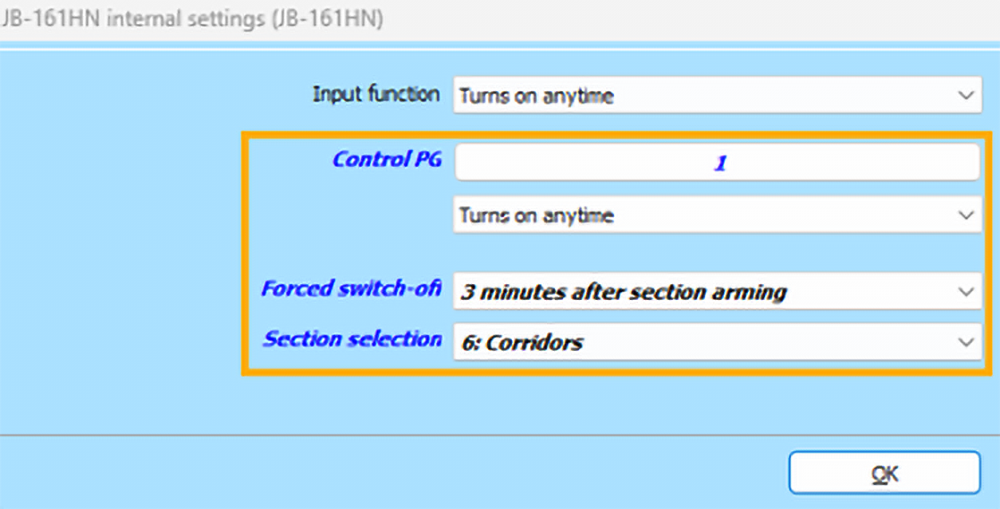
- In this case, we will need a single PG output that reacts to unsetting, which will ensure the light turns on upon arrival.

- We will leave the input function (mechanical push button / switch) at the default setting of “turn on at any time”. This allows the first employee to arrive to turn on the light manually even before unsetting the system.
- We will configure the prepared PG output in the JB-161HN module as a control with the function “turn on at any time”. This ensures the light turns on automatically upon unsetting.
- Setting the common areas will be configured as the condition for a forced shut-off. The module will thus automatically turn off the light regardless of the switch position 3 minutes after the section is set, providing sufficient time to leave.
Tip: To facilitate evacuation during a fire, set up another PG with the “copy with switch-off delay” function, activated by a response to a fire alarm. Assign this PG as a control as well.
Scenario 5: Manual lighting control from multiple locations (with a switch)
Required behaviour:
- Control of the lighting circuit using a standard switch, and simultaneously from keypads, remote controls, and MyJABLOTRON.
- Display of the actual status (on / off) in MyJABLOTRON.
What you will need:
- 1x JB-161HN module
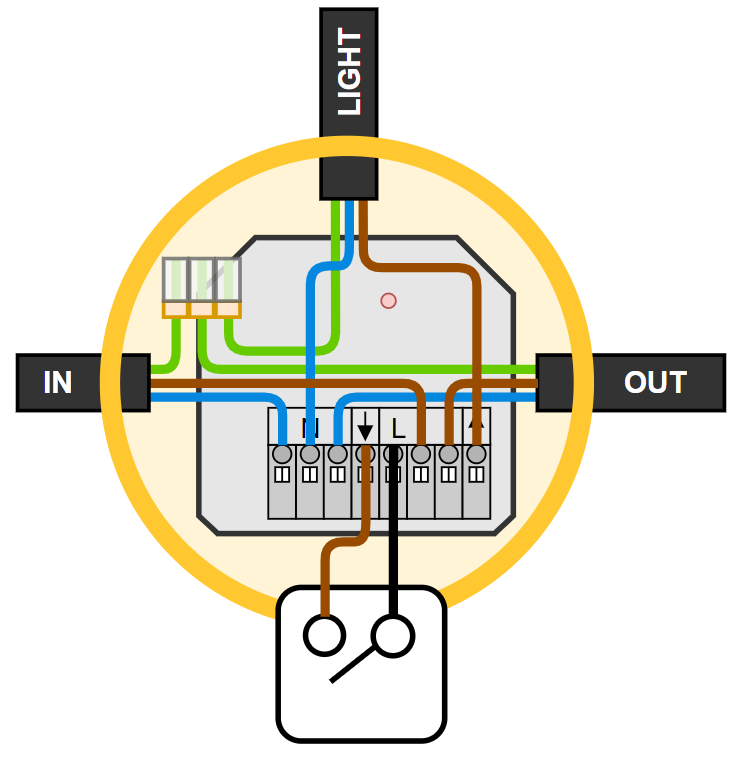
- 1x standard ON / OFF lighting switch
Wiring:
Settings:
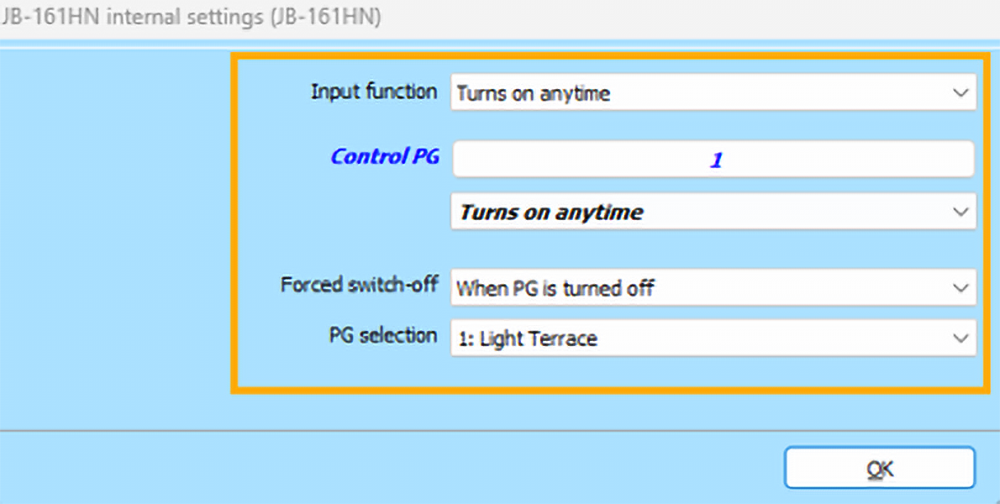
- We will need one PG output with the “on/off” function. This will be controlled by the activation of the JB-161HN module + manually from other locations such as keypads, remote controls, or MyJABLOTRON.


- In the JB-161HN module, configure the following:
- The switch connected to the input will turn the light on at any time.
- Set the prepared PG as a control, also with the “turn on at any time” function.
- At the same time, set the turning off of the control PG as the condition for a forced shut-off, allowing the light to be turned off from other locations even if the switch is in the on position.
- The switch connected to the input will turn the light on at any time.
Scenario 6: Manual lighting control from multiple locations (with push buttons)
Required behaviour:
- Control of the lighting circuit using a spring-loaded push button, and simultaneously from keypads, remote controls, MyJABLOTRON, and other JB-161HN or JB-160J modules.
- Display of the actual status (on / off) in MyJABLOTRON.
What you will need:
- 1x JB-161HN module
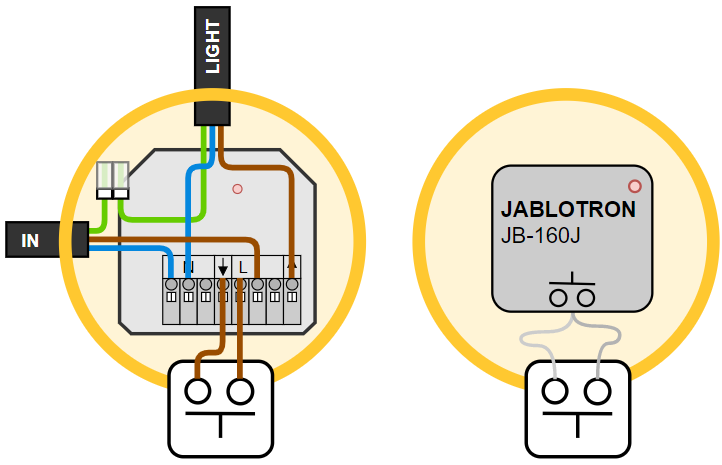
- 1x push-button lighting switch
Wiring:
Settings:
- We will need one PG output with the “change” function. This will be controlled by the activation of the JB-161HN module + manually from other locations such as keypads, remote controls, or MyJABLOTRON.
- For a multi-way (cross) switch function, you can control the same PG using additional JB-161HN or JB-160J modules.


- In the JB-161HN module, configure the following:
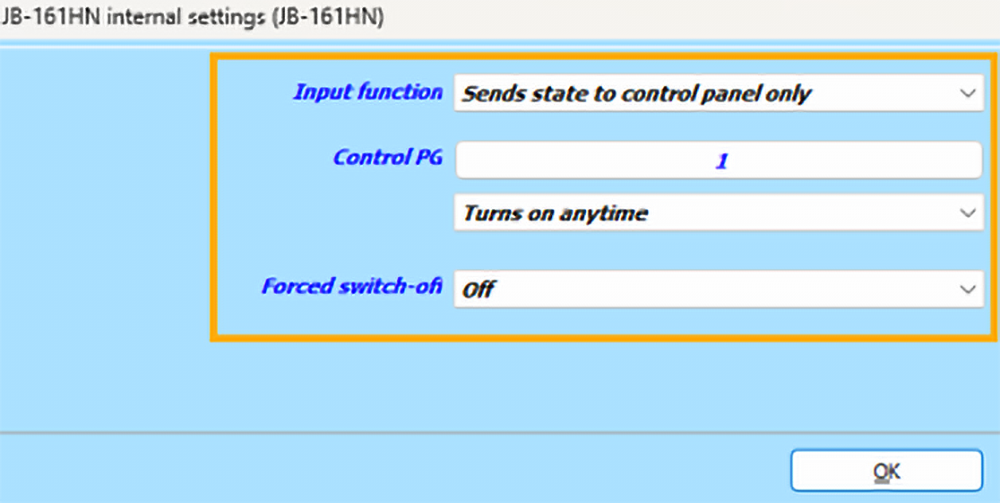
- The push button connected to the input only transmits the status to the control panel.
- Set the prepared PG as a control, also with the “turn on at any time” function.
- A forced shut-off can be utilised for other conditions, such as setting.
Scenario 7: Automatic control of a bathroom fan by a thermostat
Required behaviour:
- When the humidity in the bathroom rises, for example after showering, automatically extract the excess moisture.
- Retain the original push button for manual activation of time-limited ventilation, for example after using the toilet.
What you will need:
- 1x JB-161HN module
- 1x JB-1x1TP thermostat or JB-1x1TH sensor with humidity measurement.
- Switch (spring-loaded push button).
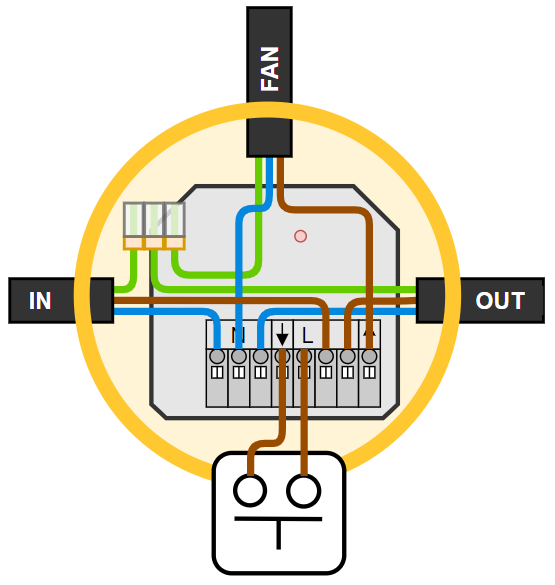
Wiring:
Settings:
- We will need 2 PG outputs:
- The first PG is designed for automatic control by the thermostat based on the measured humidity.
- The second PG, featuring the “copy with switch-off delay” function, is used for short, manually controlled ventilation outside of situations where the thermostat detects high humidity.

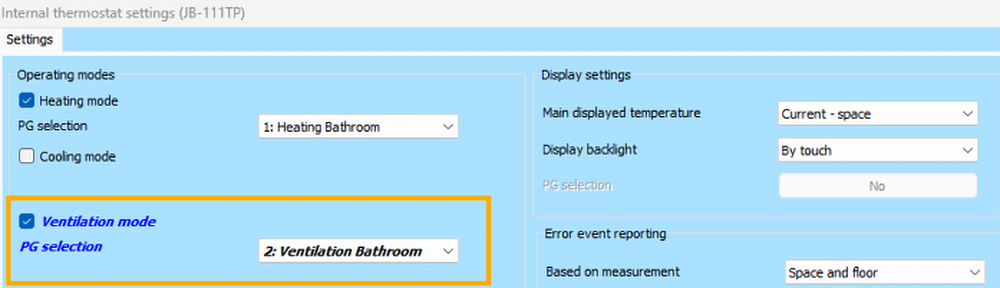
- In the thermostat/sensor settings, enable the ventilation mode and assign the first of the two prepared PGs. F-Link will automatically configure the required “on/off” function for this PG output. The control of this PG will be managed exclusively by the thermostat based on humidity.
- The threshold humidity value at which the thermostat switches on the ventilation, along with the hysteresis (the amount by which the humidity must drop for the thermostat to turn the ventilation off again), is part of the user settings of the thermostat. This is accessible within the MyJABLOTRON / MyCOMPANY applications.
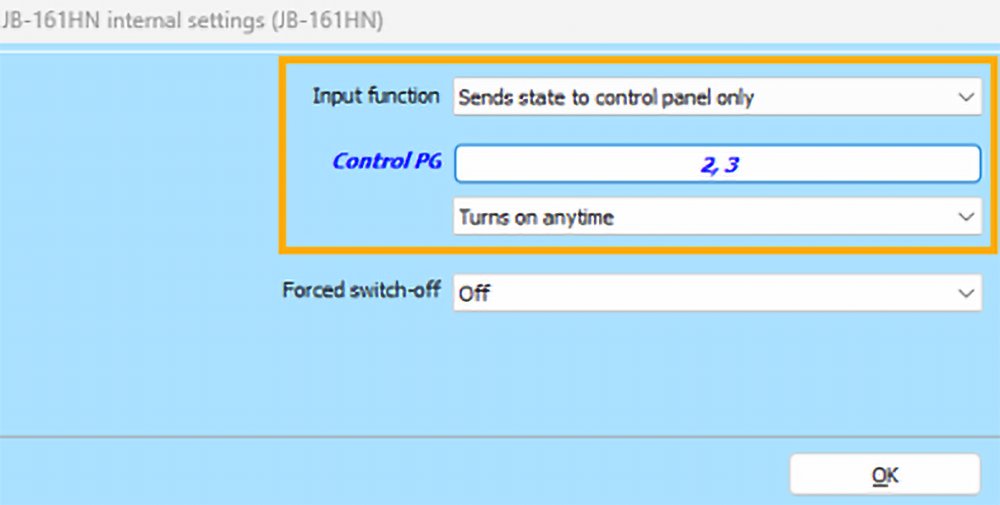
- The second prepared PG will be activated by the push button connected to the JB-161HN module, meaning directly by the peripheral device itself.

- In the internal settings of the JB-161HN module:
- Configure the input (mechanical push button) to the “only transmits status to the control panel” function. This ensures the button does not control the output directly, but instead activates the PG, which handles the timer function.
- Assign both prepared PGs as control outputs with the “turn on any time” function. The module will then copy both the ventilation managed by the thermostat based on humidity and the short ventilation controlled manually by the push button.
Scenario 8: Automatic control of a toilet / bathroom fan based on lighting
Required behaviour:
- Automatise the fan operation in connection with turning on the light in the room.
- Do not activate the fan during a short visit (up to 3 minutes) to the toilet / bathroom.
- After the light is turned off, keep the fan running for an additional 10 minutes to ensure sufficient ventilation of the room.
What you will need:
- 1x JB-161HN module
- 1x standard ON / OFF lighting switch
Wiring:
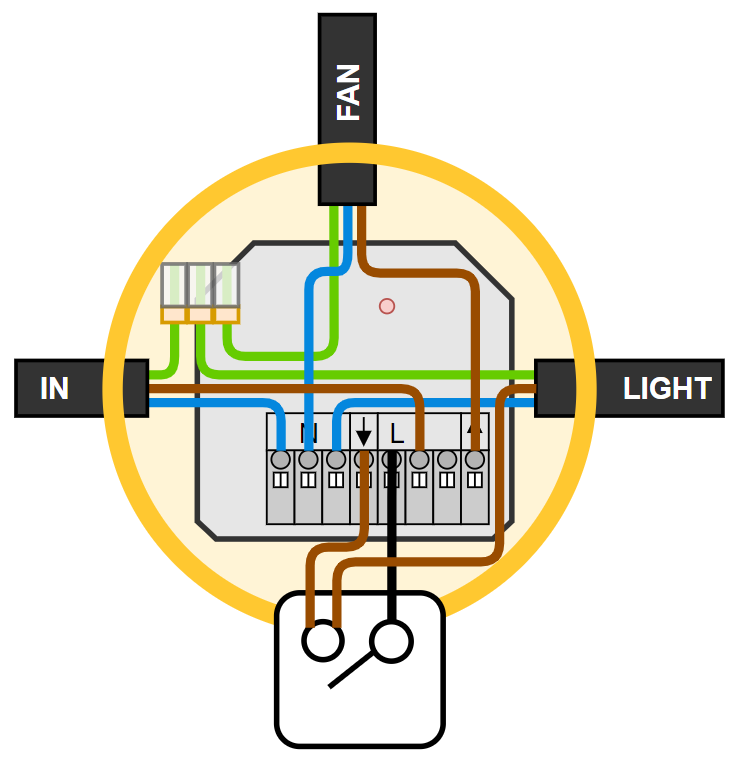
Settings:
- To achieve delayed activation and a switch-off delay, we will need 2 PG outputs:
- The first PG will start copying the switch, provided it remains turned on for at least 3 minutes.
- The second PG will copy the first one, and after it turns off, it will time an additional 10-minute switch-off delay.



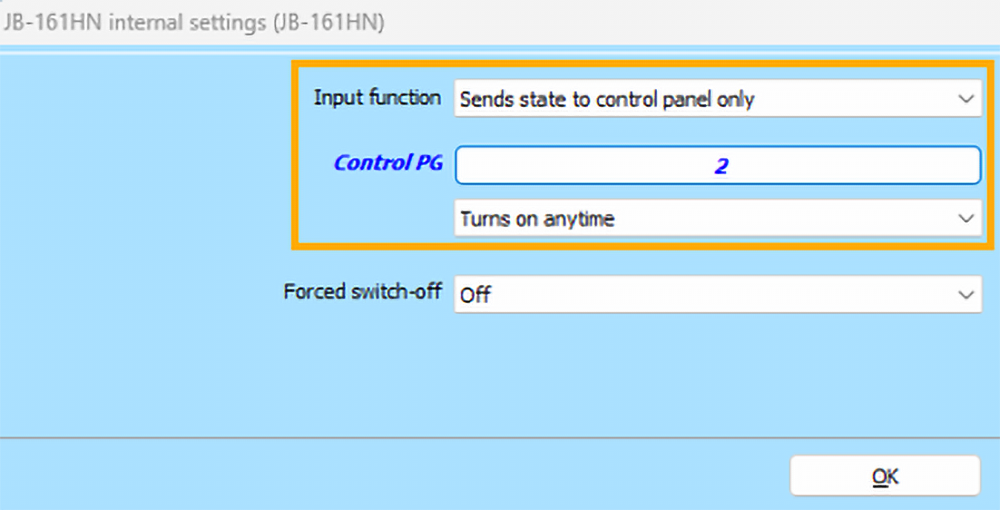
- In the JB-161HN module, configure the following:
- The input will only transmit its status to the control panel.
- The output will copy the second PG, “Fan activation”, at any time.
Didn't find what you were looking for? If you need help setting up your own scenario, please contact our technical support (https://www.jablotron.com/en/contact).